<?xml version="1.0" encoding="utf-8"?><feed xmlns="http://www.w3.org/2005/Atom" ><generator uri="https://jekyllrb.com/" version="3.10.0">Jekyll</generator><link href="/feed" rel="self" type="application/atom+xml" /><link href="/" rel="alternate" type="text/html" /><updated>2025-09-29T01:15:15+00:00</updated><id>/feed</id><title type="html">la bonne soupe</title><entry><title type="html">qrocodile: A Kid-friendly Sonos Controller</title><link href="/2018/02/14/introducing-qrocodile/" rel="alternate" type="text/html" title="qrocodile: A Kid-friendly Sonos Controller" /><published>2018-02-14T19:27:40+00:00</published><updated>2018-02-14T19:27:40+00:00</updated><id>/2018/02/14/introducing-qrocodile</id><content type="html" xml:base="/2018/02/14/introducing-qrocodile/"><![CDATA[<p>It all started one night at the dinner table over winter break.
The kids wanted to put an album on the turntable (hooked up to
the line-in on a Sonos PLAY:5 in the dining room).
They’re perfectly capable of putting vinyl on the turntable all
by themselves, but using the Sonos app to switch over to play
from the line-in is a different story.</p>

<p>I was lamenting aloud the number of steps it takes, and then my
brain got started pondering solutions.
Take off my tin foil hat and give in to the Alexa craze?
Buy some sort of IoT button thing?
An RFID tag thing? QR codes maybe?
The latter option got me thinking of all kinds of possibilities.
Maybe the kids could choose dinner music from any number of
songs/albums (from Spotify or my local collection) just by
waving a QR code in front of something.
Or maybe now they could build their own dance party playlists.</p>

<p>It seemed like a fun thing to explore, so I ordered a Raspberry
Pi and a cheap camera.
The next day it arrived and the hacking began.
This was a fun little (multi-)weekend project.
What started as “make the simplest possible thing to switch to
line-in” quickly led to all kinds of unexpected diversions.
Eventually we ended up with something called <code class="language-plaintext highlighter-rouge">qrocodile</code>,
which can be best summarized as a kid-friendly system for
controlling Sonos using cards imprinted with QR codes.</p>

<div style="display: flex; margin-bottom: 20px;">
  <div style="flex: 50%; padding-right: 1%;">
    <a href="https://flickr.com/photos/chrispcampbell/38677871980/in/album-72157693866089215/">
      <img style="width: 100%" src="https://live.staticflickr.com/4653/38677871980_ce4b8b8c6e_n.jpg" />
    </a>
  </div>
  <div style="flex: 50%; padding-left: 1%;">
    <a href="https://flickr.com/photos/chrispcampbell/25617161267/in/album-72157693866089215/">
      <img style="width: 100%" src="https://live.staticflickr.com/4651/25617161267_c2621cca3f_n.jpg" />
    </a>
  </div>
</div>

<p>I made a video to demonstrate how <code class="language-plaintext highlighter-rouge">qrocodile</code> works and to
give a brief glimpse of what it took to put the (physical)
pieces together:</p>

<div class="video-container">
<iframe class="video-embed" src="https://www.youtube.com/embed/yjEDAvP4rCc?rel=0&amp;showinfo=0" width="560" height="315" frameborder="0" allowfullscreen="allowfullscreen"></iframe>
</div>

<p>The <a href="https://github.com/chrispcampbell/qrocodile">source code</a>
is available on GitHub along with a fair amount of technical
documentation.</p>

<p>It’s been interesting seeing the kids putting the thing through
its paces during their frequent “dance parties”, queuing up
their favorite songs and uncovering new ones.
I really like that they can use tangible objects to discover
music in much the same way I did when I was their age, looking
through my parents records, seeing which ones had interesting
artwork or reading the song titles on the back, listening and
exploring. 
That sort of experience has nearly disappeared in the age of
music streaming and digital music libraries.
(I’ve got a fair amount of vinyl, but 10 times that amount in
a digital music library ripped from CDs, so this has been a
nice way to expose songs that might otherwise be hidden somewhere
on a hard drive.)</p>

<p>This system has a number of advantages over voice assistants like
Alexa.
My kids don’t often know the proper name of a song and wouldn’t
necessarily think to request a certain song, but if they see a
stack of cards on the table, they can recognize a band’s name
or an album cover by sight and build up a whole queue of songs
simply by stacking and organizing their cards.
It’s fun to watch, and I hope this project inspires you to
introduce this sort of physical computing into your own home.</p>]]></content><author><name></name></author><category term="code" /><summary type="html"><![CDATA[It all started one night at the dinner table over winter break. The kids wanted to put an album on the turntable (hooked up to the line-in on a Sonos PLAY:5 in the dining room). They’re perfectly capable of putting vinyl on the turntable all by themselves, but using the Sonos app to switch over to play from the line-in is a different story.]]></summary></entry><entry><title type="html">Sloan-o-graph</title><link href="/2014/10/30/sloan-o-graph/" rel="alternate" type="text/html" title="Sloan-o-graph" /><published>2014-10-30T16:16:09+00:00</published><updated>2014-10-30T16:16:09+00:00</updated><id>/2014/10/30/sloan-o-graph</id><content type="html" xml:base="/2014/10/30/sloan-o-graph/"><![CDATA[<p>As I watched <a href="http://sloanmusic.com/">Sloan</a> take the stage last week at the
Rickshaw Stop and launch into Andrew’s 18-minute-long “Forty-Eight Portraits”,
three lines of thought came to mind:</p>

<ol>
  <li>I’ve been a Sloan fan for over 20 years now? Really?</li>
  <li>This is my, what, tenth time seeing them live? Seriously?</li>
  <li>How come Jay doesn’t sing backup when he switches onto the bass? Actually,
on which songs <em>does</em> he sing backup? How often do those two interact anyway?
What about Patrick and Andrew?</li>
</ol>

<p>On a lark, I decided to build a one-off web app to help answer these vital questions.
So, here we have it: the <a href="/sloan">sloan-o-graph</a>.
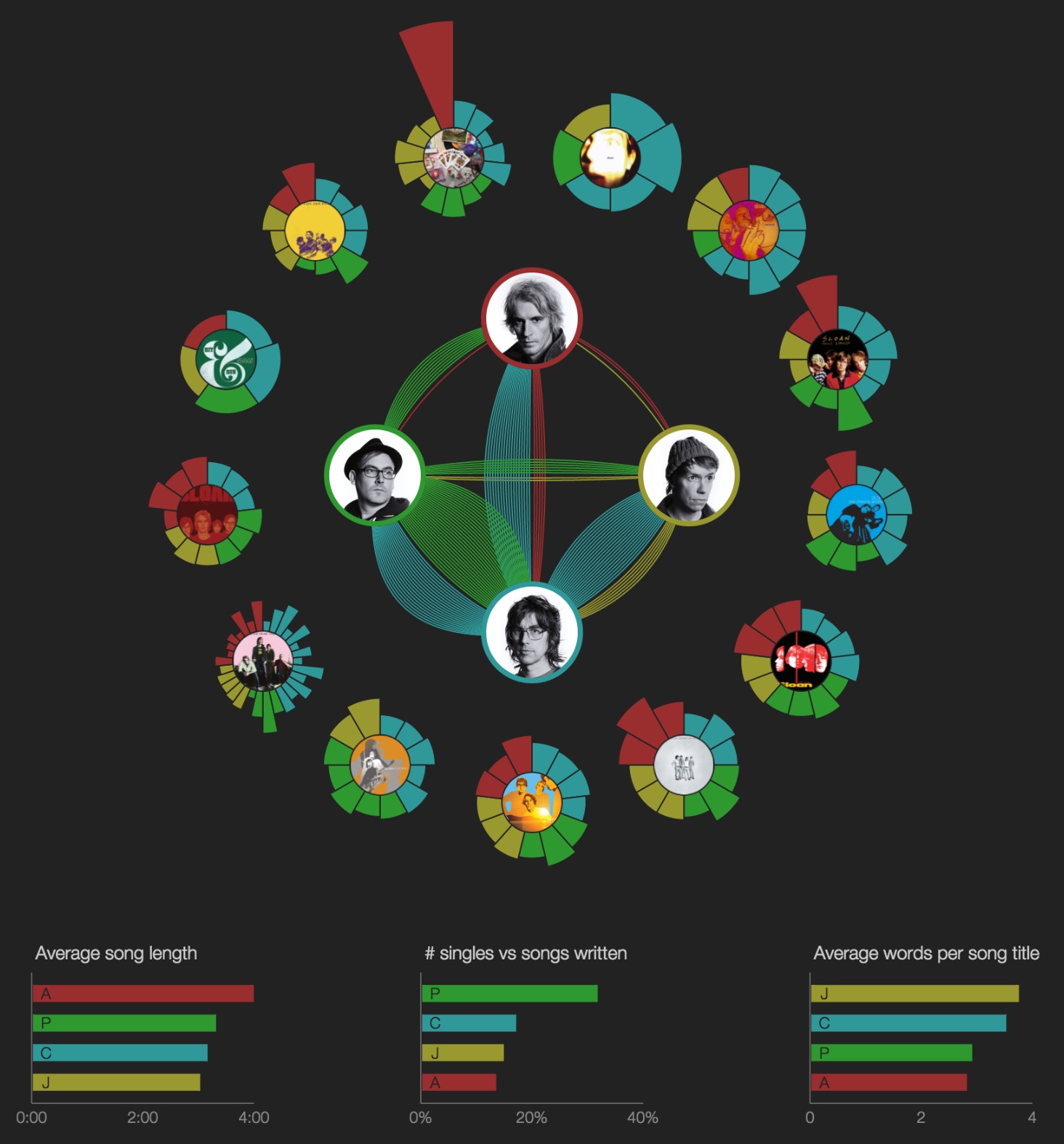
Here’s a non-interactive screenshot in case you’re too lazy to click through:</p>

<center>
<a href="/sloan">
  <img style="margin-top: 8px; margin-bottom: 24px;" src="/assets/images/sloan-o-graph.jpg" alt="sloan-o-graph" width="600" />
</a>
</center>

<p>In the interactive version, you can roll over songs, albums, and band members
to help visualize all the relationships.
For now, it’s best viewed on a desktop or laptop computer; it sort of works on
the iPad, but that’s a project for another day.
It covers all 13 proper LPs and EPs. Bonus tracks, b-sides, singles: not included.
(Again, maybe another day.)</p>

<p><em>[<strong>Update 2016.4.14</strong>: That day arrived; b-sides and rarities are now included, as
are outtakes from the box sets. Some new charts were added, too.]</em></p>

<p><em>[<strong>Update 2022.10.23</strong>: Sloan’s new album, Steady, was released today.  New album
means new updates to the Sloan-o-graph!  Now works on phones.  Smoother animations.
Updated photos.  More readable text.]</em></p>

<p><em>[<strong>Update 2025.9.26</strong>: Sloan’s new album, Based on the Best Seller, was released
today.  To make room for it, I moved their two EPs to the outside, to replace the
rarities and outtakes albums.  I also added a new option to highlight Gregory
Macdonald’s contributions.  He’s had his hands on every album starting with
Parallel Play.  I don’t know exactly what songs he’s on, but it sounds from
the band like he’s been on most, so for now I’m showing him as backup on every
song since 2008.]</em></p>

<p>The pie slices are color-coded according to the primary songwriter and/or lead
vocalist.
The length of each pie slice corresponds to the length of the song. The lines
between band members indicate backing vocals and/or co-writing credits.
For example, a green line from Patrick to Chris means that Patrick sang backup
on a song for which Chris sang lead.</p>

<p>Note that the band is notoriously democratic, which mean most songs are listed
in the liner notes as being written and performed by Sloan, and sometimes it’s
not clear cut whether it’s, say, a Jay song or a Chris song or whatever, and
the band probably prefers it that way.
Sometimes it’s obvious who the primary songwriter was, but it’s not always as
easy figuring out who provides backing vocals. I’m sure I made mistakes, so
feel free to send in any corrections and I’ll fix things up.</p>

<p>I think it’s interesting to see how their democracy has evolved over time.
The data makes it look like it was the Chris Murphy Show in the early days,
but within a few years the per-album workload became pretty even, and the amount
of collaboration has continued to rise. Any asymmetry evidenced in these charts
only tells a small portion of the story; Sloan is one of those bands that’s
always been way more than the sum of its parts.</p>

<p>Anyway, enough talk. Poke around and draw your own conclusions.</p>]]></content><author><name></name></author><category term="music" /><category term="code" /><summary type="html"><![CDATA[As I watched Sloan take the stage last week at the Rickshaw Stop and launch into Andrew’s 18-minute-long “Forty-Eight Portraits”, three lines of thought came to mind:]]></summary></entry><entry><title type="html">Juvenilia: Virtual Amusement Park in VR386</title><link href="/2014/03/11/juvenilia-virtual-amusement-park-in-vr386/" rel="alternate" type="text/html" title="Juvenilia: Virtual Amusement Park in VR386" /><published>2014-03-11T15:07:29+00:00</published><updated>2014-03-11T15:07:29+00:00</updated><id>/2014/03/11/juvenilia-virtual-amusement-park-in-vr386</id><content type="html" xml:base="/2014/03/11/juvenilia-virtual-amusement-park-in-vr386/"><![CDATA[<p>[Short version: I recently came across the intentionally awful
<a href="https://www.youtube.com/user/really3d">Really3D</a> channel (check out
<a href="https://www.youtube.com/watch?v=W5YhguVao0U&amp;list=TLQVjiq8GDBPdFNnAmlS8Syhi0XhRhqVTS">their version</a>
of The Simpsons intro, for example) and it reminded me of the
unintentionally primitive virtual reality programming I did as a
teenager.
I managed to revive some of that work and made the following video
(<a href="https://youtu.be/Owh3eOKZPYs">YouTube link</a>).
If you care to read some of the back story, there’s more after the embed.]</p>

<div class="video-container">
<iframe class="video-embed" width="560" height="315" src="https://youtube.com/embed/Owh3eOKZPYs" frameborder="0" allowfullscreen=""></iframe>
</div>

<p>Back in the early 1990s, long before the much-anticipated Oculus Rift
HMD or even the much-maligned
<a href="https://en.wikipedia.org/wiki/VRML">VRML</a> web standard, there was a small
group of academics building virtual reality software that could be
run on average consumer PCs.
Bernie Roehl and Dave Stampe created one such DOS program,
<a href="https://ece.uwaterloo.ca/~broehl/rend386.html">REND386</a>,
that later evolved into Roehl’s
<a href="https://ece.uwaterloo.ca/~broehl/avril.html">AVRIL</a> and Stampe’s
<a href="https://groups.google.com/forum/#!topic/sci.virtual-worlds/8aQEu-WiknI">VR386</a>.</p>

<p>As a geeky teenager with an interest in all things graphics, I was
fascinated that I could run these programs on our home PC (i486 if
memory serves), trying out all kinds of virtual “worlds” — often not
much more than a few small 3D models — submitted by average users
on the newsgroups. I cut my teeth on 3D graphics programming and
animation using REND386 and VR386 and learned a whole lot about
the joys of basic linear algebra along the way.</p>

<p>Even cooler was that VR386 had support for navigating worlds and
manipulating objects using my dust-gathering Nintendo
<a href="https://en.wikipedia.org/wiki/Power_Glove">Power Glove</a> via an
inexpensive homebrew serial connection kit that I was able to
afford with monies from my part-time dishwashing job. (Yes,
the Power Glove finally had a valid use case other than beating
Glass Joe in less than 27 seconds. Or serving as a
<a href="https://youtube.com/watch?v=KZErvASwdlU">meme/punchline</a>.)</p>

<p>I think I was around 13 when I tried creating my first virtual world
for REND386: an AC/DC concert (modeled after my favorite
“Live at Donington” VHS tape that had probably already been worn out
by that time from being played and rewound endlessly).
I remember there being a golem-like Brian Johnson, riding a crude 3D
model of the “Hell’s Bells” bell, and a duck-walking Angus Young.
I’m sure it would be both hilarious and cringe-worthy had it survived,
but unless it’s bit-rusting in my parents’ basement, I think it’s
been lost to the ages.</p>

<p>Fortunately, thanks to the magic of various archive mirrors
(and VirtualBox!) I was able to locate and revive the one project I
was relatively proud of: DZZYLAND.
Some time in late 1994 or early 1995 I met some like-minded VR hobbyists
via Usenet and AOL, and we had the idea of collaborating on a whole
virtual amusement park built in VR386.
As a young kid, my family spent way too much time at the Dutchess
County Fair every summer, and I’d often draw pictures or build models
of midway rides, presumably to mask the depression I encountered after
the fair closed up shop for the year.
So I got pretty excited at the prospect of building ride models with
something other than drinking straws.</p>

<p>I think I used some sort of shareware CAD program to build 3D models
and then cobbled them together (think duct tape) with a text editor,
painstakingly tweaking coordinates and adjusting transforms and animation
parameters in what must have been an awfully mind-numbing edit/compile/test
cycle.
I ended up building three rides from memory: the
Orbiter (<a href="https://en.wikipedia.org/wiki/Orbiter_(ride)">Wikipedia</a>,
<a href="https://www.youtube.com/watch?v=o4_u_EvAmlg">YouTube</a>),
the Rainbow (<a href="https://en.wikipedia.org/wiki/Rainbow_(ride)">Wikipedia</a>,
<a href="https://www.youtube.com/watch?v=QyIAJ_U4gvw">YouTube</a>),
and a Log Flume ride (<a href="https://en.wikipedia.org/wiki/Log_flume_(ride)">Wikipedia</a>,
<a href="https://www.youtube.com/watch?v=o7oysK-Jr5U">YouTube</a>).
Other people in our so-called “AOL Community World Builders” group, or
CommWld’ers for short, were responsible for the other rides and buildings,
such as the gondola, swings, and hot dog (?) stand.</p>

<p>The results in the video above speak for themselves: pretty amateurish,
but also pretty impressive that it could all be built with free software
by average (non-)developers in a friendly, collaborative, open-source-like
development team.
I just remembered that we even received an award for DZZYLAND from VRASP
(Virtual Reality Alliance of Students and Professionals), which at the time
felt like an honor (but considering that I can find no mention of the award
on the web, or much information about VRASP for that matter, it’s not like
we won an Academy Award or anything).
In later years I realized that it was actually a pretty unique character-building
experience, where people 2 or 3 or 5 times my age, whom I had never met in
person, were willing to go along with my ideas and be constructive and nice
and helpful and never once condescending along the way.</p>

<p>For the sake of posterity (or if you’re interested in stepping into a time
machine back to 1995), I’ve gathered some links and resources that I used
to make the above video and to refresh my fuzzy memory.</p>

<p><a href="https://www.ibiblio.org/pub/academic/computer-science/virtual-reality/rend386/worlds/wlds.txt">wlds.txt</a>
(<a href="/files/dzzyland/wlds.txt">local mirror</a>)
<br />
Some sort of index of various REND386/VR386 world files; one of the only places
I was able to find mention of the AOL CommWld project.</p>

<p><a href="ftp://ftp.ibiblio.org/pub/academic/computer-science/virtual-reality/rend386/worlds/dzzyland.zip">dzzyland.zip</a>
(<a href="/files/dzzyland/dzzyland.zip">local mirror</a>)
<br />
A zip file containing the DZZYLAND “source” files.</p>

<p><a href="ftp://ftp.pgp.net/pub/sci/virtual-reality/software/vr386/vr386.zip">vr386.zip</a>
<br />
A VR386 source/binary distribution for DOS circa late 1994.</p>

<p><a href="https://www.dropbox.com/s/td8zmuwsizpswkr/dos-vm-with-dzzyland.zip?dl=0">dos-vm-with-dzzyland.zip</a>
<br />
A zip file containing a VirtualBox VM running DOS 6.22 (I created it using these
instructions) along with VR386 and the requisite DZZYLAND files unpacked in
<code class="language-plaintext highlighter-rouge">c:\vr386</code>; assuming you can get the VM running, you can launch DZZYLAND simply
by typing “go” at the <code class="language-plaintext highlighter-rouge">c:</code> prompt.</p>]]></content><author><name></name></author><category term="code" /><summary type="html"><![CDATA[[Short version: I recently came across the intentionally awful Really3D channel (check out their version of The Simpsons intro, for example) and it reminded me of the unintentionally primitive virtual reality programming I did as a teenager. I managed to revive some of that work and made the following video (YouTube link). If you care to read some of the back story, there’s more after the embed.]]]></summary></entry><entry><title type="html">Saved By Old Times</title><link href="/2012/03/18/saved-by-old-times/" rel="alternate" type="text/html" title="Saved By Old Times" /><published>2012-03-18T12:14:30+00:00</published><updated>2012-03-18T12:14:30+00:00</updated><id>/2012/03/18/saved-by-old-times</id><content type="html" xml:base="/2012/03/18/saved-by-old-times/"><![CDATA[<p>Every so often while I’m doing the dishes, the sunlight will come in at
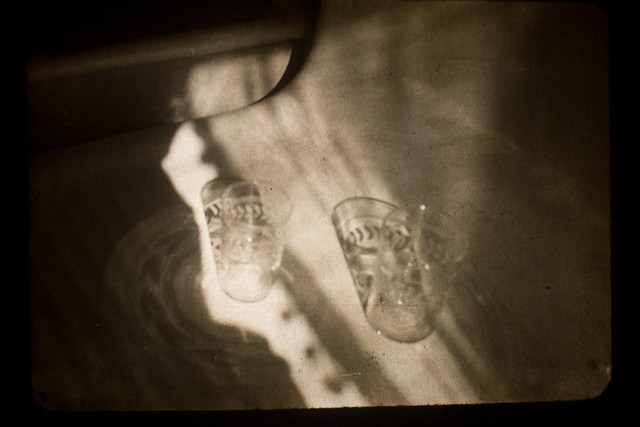
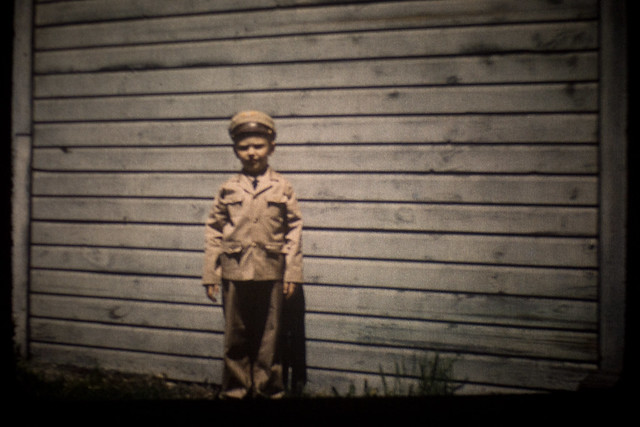
just the right angle, and I’ll be reminded of this photograph (ca. 1945)
that my family discovered a few years ago:</p>

<p>
<center>
<a title="IMG_2995 by chrispcampbell, on Flickr" href="https://www.flickr.com/photos/chrispcampbell/3169450431/"><img src="https://farm4.staticflickr.com/3102/3169450431_860f96855a_z.jpg" alt="IMG_2995" width="640" height="427" /></a>
</center>
<br />
</p>

<p>One day around Christmas 2008, my dad came across a box of old slides and
films; that night we set up our antiquated projectors and had ourselves a
good old fashioned slideshow.
I believe (or at least we think) many of these photos were taken by his
father, A. Herbert Campbell, some time in the 40’s and 50’s.
(For the sake of our family history, I should probably revisit these and
record the actual dates and people instead of just guessing.)</p>

<p>I took the lo-fi route and captured a few of my favorite projected photos
with my DSLR while the slideshow was ongoing.
There are certainly better ways to preserve old photos, but I really like
how these turned out.
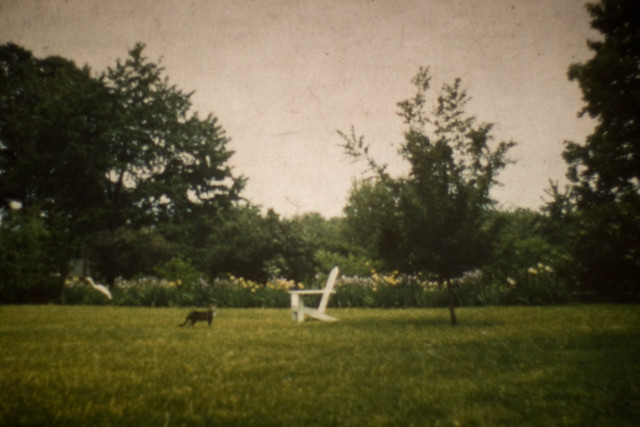
This one featured three of my favorite things: a cat, an Adirondack chair,
and a tree, all neatly arranged into thirds:</p>

<p>
<center>
<a title="IMG_3024 by chrispcampbell, on Flickr" href="https://www.flickr.com/photos/chrispcampbell/3170284262/"><img src="https://farm4.staticflickr.com/3018/3170284262_167b4846d4_z.jpg" alt="IMG_3024" width="640" height="427" /></a>
</center>
<br />
</p>

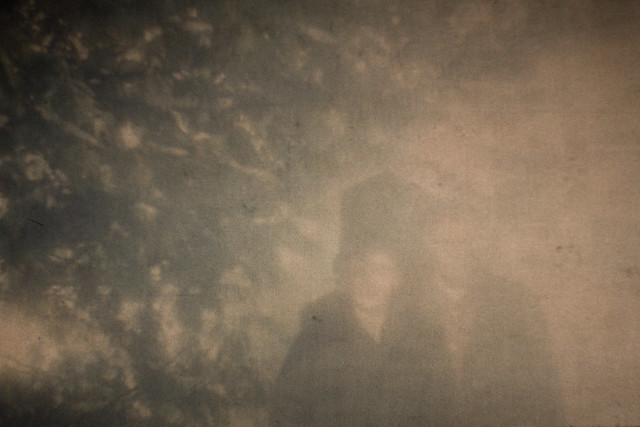
<p>This one was badly washed out, but I loved the ethereal quality so much that
I came back to San Francisco and attempted to create a painting based on the
photograph.
(The result wasn’t good enough to include here, but one can find it over on
the <a href="https://nonabsorbing.blogspot.com/">blog</a> that I share with Candice.)
I believe that’s my grandmother, Helen, on the left, with A. Herbert to the
right:</p>

<p>
<center>
<a title="IMG_3022 by chrispcampbell, on Flickr" href="https://www.flickr.com/photos/chrispcampbell/3169453609/"><img src="https://farm4.staticflickr.com/3260/3169453609_10110d71cd_z.jpg" alt="IMG_3022" width="640" height="427" /></a>
</center>
<br />
</p>

<p>Here’s my Uncle Tom. I never got to meet him, but from all the stories he
seemed like a swell guy:</p>

<p>
<center>
<a title="IMG_3002 by chrispcampbell, on Flickr" href="https://www.flickr.com/photos/chrispcampbell/3170281340/"><img src="https://farm4.staticflickr.com/3226/3170281340_caf9a93b2f_z.jpg" alt="IMG_3002" width="640" height="427" /></a>
</center>
<br />
</p>

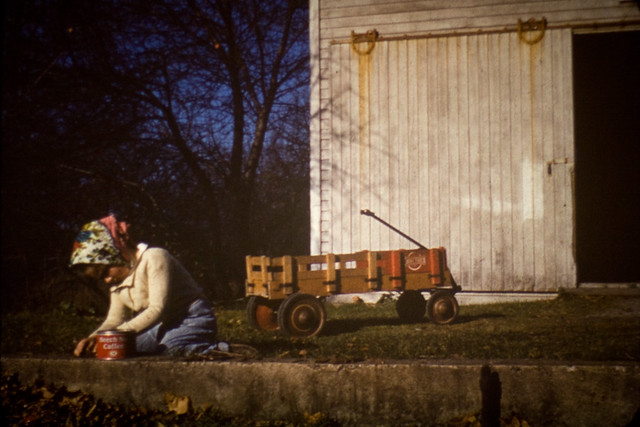
<p>I think my Aunt Lupie (Helen to the rest of the world) identified herself
in this one.
I love the wagon and the barn door and the blue sky and the headscarf and
just about everything:</p>

<p>
<center>
<a title="IMG_3006 by chrispcampbell, on Flickr" href="https://www.flickr.com/photos/chrispcampbell/3170281974/"><img src="https://farm2.staticflickr.com/1172/3170281974_1fd6d53753_z.jpg" alt="IMG_3006" width="640" height="427" /></a>
</center>
<br />
</p>

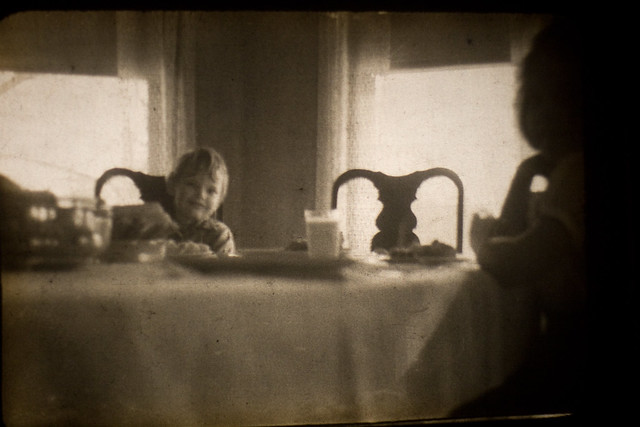
<p>Mmm, mmmilk. And an interesting angle here:</p>

<p>
<center>
<a title="IMG_3009 by chrispcampbell, on Flickr" href="https://www.flickr.com/photos/chrispcampbell/3169452309/"><img src="https://farm2.staticflickr.com/1171/3169452309_6d6a55be04_z.jpg" alt="IMG_3009" width="640" height="427" /></a>
</center>
<br />
</p>

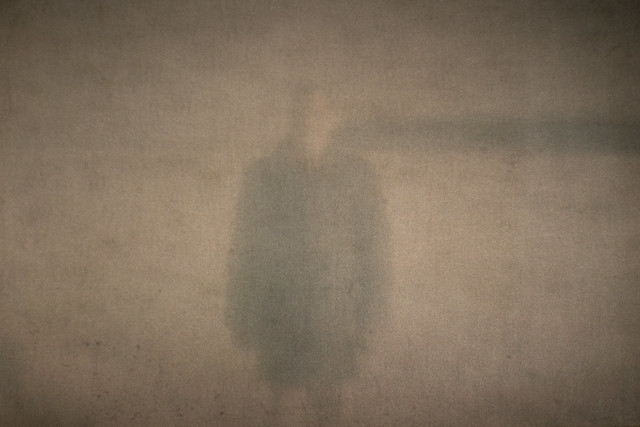
<p>Another ghostly visage, unidentified:</p>

<p>
<center>
<a title="IMG_3013 by chrispcampbell, on Flickr" href="https://www.flickr.com/photos/chrispcampbell/3169452925/"><img src="https://farm4.staticflickr.com/3170/3169452925_1e9b1fa78e_z.jpg" alt="IMG_3013" width="640" height="427" /></a>
</center>
<br />
</p>

<p>Likewise, here. I think I just found my next album cover:</p>

<p>
<center>
<a title="IMG_2985 by chrispcampbell, on Flickr" href="https://www.flickr.com/photos/chrispcampbell/3169449463/"><img src="https://farm4.staticflickr.com/3080/3169449463_f81e666e51_z.jpg" alt="IMG_2985" width="640" height="427" /></a>
</center>
<br />
</p>]]></content><author><name></name></author><category term="photography" /><summary type="html"><![CDATA[Every so often while I’m doing the dishes, the sunlight will come in at just the right angle, and I’ll be reminded of this photograph (ca. 1945) that my family discovered a few years ago:]]></summary></entry><entry><title type="html">Three Variations on Gray</title><link href="/2011/09/08/three-variations-on-gray/" rel="alternate" type="text/html" title="Three Variations on Gray" /><published>2011-09-08T03:04:53+00:00</published><updated>2011-09-08T03:04:53+00:00</updated><id>/2011/09/08/three-variations-on-gray</id><content type="html" xml:base="/2011/09/08/three-variations-on-gray/"><![CDATA[<p>It’s been at least six years since I last played around with time
lapse photography.
On my last half-hearted attempt, I tried to capture the rising tide
surrounding the
<a href="https://www.flickr.com/photos/chrispcampbell/5505476898/in/set-72157626213627278/">Floating Torii</a>
in Miyajima, with no tripod and a not-so-great camera.
Ever since, I’ve been wanting to capture something on a grand scale,
something like the grayness that envelops San Francisco every summer,
but until this weekend I never worked up the energy and patience to
try it out.</p>

<p>I spend a lot of time idly looking out our windows, watching the fog
and clouds that drift past.
Life in the Inner Sunset is often dictated by the low clouds that peel
back for (at best) a couple hours in mid-afternoon before roaring back
towards downtown just before supper time.
I got a bit lucky this weekend in that I was able to capture the three
most common variations on this theme: 1) dense, quickly moving fog;
2) thick, slower moving clouds that periodically tease us with views
of the downtown skyline; 3) light cloud cover that reveals blue skies
before engulfing the entire city just before sunset.
I was slightly disappointed that the blue sky lasted so long on Monday
if only because it makes for a less interesting time lapse, but the dark
clouds that take over at the very end are worth the wait.
At the very least, I’m glad that I was able to capture a typical summer
scene before our perfect Indian summer sets in this week.</p>

<p>Anyway, the video is
<a href="https://youtube.com/watch?v=sNiXUMNzqb8">available on YouTube</a>
and embedded below as well (best viewed at 720p).
The frames were captured using my Canon 7D.
I created the video clips using Lightroom’s slideshow mode, but
unfortunately all I had available for editing purposes was an ancient
version of iMovie, so the quality is awful, especially during the fade
transitions. I learned a lot this weekend, and next time around I’ll
use more care in the way I shoot (and post-process).</p>

<div class="video-container">
<iframe class="video-embed" width="560" height="315" src="https://youtube.com/embed/sNiXUMNzqb8" frameborder="0" allow="accelerometer; autoplay; encrypted-media; gyroscope; picture-in-picture" allowfullscreen=""></iframe>
</div>]]></content><author><name></name></author><category term="photography" /><summary type="html"><![CDATA[It’s been at least six years since I last played around with time lapse photography. On my last half-hearted attempt, I tried to capture the rising tide surrounding the Floating Torii in Miyajima, with no tripod and a not-so-great camera. Ever since, I’ve been wanting to capture something on a grand scale, something like the grayness that envelops San Francisco every summer, but until this weekend I never worked up the energy and patience to try it out.]]></summary></entry><entry><title type="html">iPhoto to Lightroom (to Flickr and Beyond)</title><link href="/2011/04/03/iphoto-to-lightroom-to-flickr-and-beyond/" rel="alternate" type="text/html" title="iPhoto to Lightroom (to Flickr and Beyond)" /><published>2011-04-03T17:54:50+00:00</published><updated>2011-04-03T17:54:50+00:00</updated><id>/2011/04/03/iphoto-to-lightroom-to-flickr-and-beyond</id><content type="html" xml:base="/2011/04/03/iphoto-to-lightroom-to-flickr-and-beyond/"><![CDATA[<p>Ever since taking a mild interest in photography back in high school, I’ve gone through various stages…</p>

<p>There have been the usual wallet-draining equipment upgrades every few years. A cheap point-and-shoot film camera in 1996. My first digital camera [a Kodak DC 280] in 1999. A better point-and-shoot digital [a Canon S60] in 2004. My first DSLR [a Canon XTi] in 2006. And finally, the leap to a Canon 7D earlier this year.</p>

<p>There were different organization methods and tools… Originally I just scanned photos in and scattered them haphazardly on my hard drive. Later I tried some shoddy photo manager from Ulead, which was so limiting (only 256 characters for comments? binary file format?) that I started writing my own photo organization software in 1999 (called JAlbum, not to be confused with a later, presumably more successful product of the same name). I rarely used the desktop app part of JAlbum, but there was a barebones photo album server component to it that I ran on my own Linux box for a few years. Eventually I got tired of managing (and hearing) my homebuilt server and photo software, so around 2005 I decided to give in and just get a Mac mini for serving photos to the few friends that wanted to see them, and started entrusting my expanding photo library to iPhoto.</p>

<p>When I upgraded to a Flickr Pro account back in 2006, I attempted to draw a line in the sand, thinking that I would only post new (presumably only good) photos on Flickr. I’d keep all the old photos backed up through some combination of CD-Rs and DVDs and hard drives strategically placed around the country. When I started shooting RAW full time in 2007 and moved on to Lightroom, I made a similar decision (or so I thought) to just keep the new/good photos organized in Lightroom, and leave the rest sitting in iPhoto for posterity.</p>

<p>The reason I mention all this boring history is to make it clear that my decisions never last, and I’m always thinking that there must be a better way to shoot photos and to organize them. Specifically, I’ve been worried about losing old photos, even if only a small handful will be of interest decades from now. So a few weeks ago, as if I had tons of spare time on my hands (which I no longer do; my days are filled with chasing the little tyke around the house), I got it in my head that I would REALLY get my money’s worth from my Flickr Pro account and use it as a backup-backup solution for all my photos.</p>

<p>The general plan was to write some scripts to migrate all my 1997-2008 photos over to Lightroom, preserving as much of the keywording, titles, and captions that I had added over the years in iPhoto and my homebrewed apps. Then once I was satisfied with that, I would find any of the pre-2006 photos (and videos) not already at Flickr and make sure they were available there as well. When complete, I wanted to make sure that for every photo in my Lightroom catalog there would be a corresponding item at Flickr, and vice versa (no duplicates, all organized into folders/sets, no loose ends).
<br />
<br /></p>

<p><strong>1. Migrate iPhoto albums to Lightroom folders</strong></p>

<p>Prior to using iPhoto, I organized my photos on my hard drive by placing photos for a given day in a folder named “MMDD (Single Event Title)”, like this:</p>

<div class="language-plaintext highlighter-rouge"><div class="highlight"><pre class="highlight"><code>Pictures/
    2003/
        ...
    2004/
        0307 (Alamere Falls)
        0501 (Coachella)
        0515 (Mendocino)
        0617 (Mean Toledo)
        0703 (At Camp)
        0704 (At Camp)
        0708 (Adirondack Chair)
        ...
    2005/
        ...
</code></pre></div></div>

<p>When I started using iPhoto, I preserved this directory structure, but I also organized them into iPhoto albums, which allowed for logical groupings of multi-day events and made it easier to upload a whole album to a Flickr set. At the time, I preferred to have most recent albums at the top of the album browser, so the above folder structure might have translated to iPhoto albums like this:</p>

<div class="language-plaintext highlighter-rouge"><div class="highlight"><pre class="highlight"><code>    Y2005
        ...
    Y2004
        July 4th in Red Hook
        Mean Toledo
        Mendocino
        Coachella
        Alamere Falls
</code></pre></div></div>

<p>However, once I started using Lightroom a few years ago, I settled back on a naming convention that was a hybrid of those two approaches, placing all photos from a logical event into a folder named “MM.DD Event Title”. (In case of multi-day events, MM.DD refers to the first day of the event.) So, I decided to write a little AppleScript that would take a selection of iPhoto albums and copy each album’s contents into a folder using this new naming scheme, for example:</p>

<div class="language-plaintext highlighter-rouge"><div class="highlight"><pre class="highlight"><code>    Pictures/
        2003/
            ...
        2004/
            03.07 Alamere Falls
            05.01 Coachella
            05.15 Mendocino
            06.17 Mean Toledo
            07.03 July 4th in Red Hook
            ...
        2005/
            ...
</code></pre></div></div>

<p>In addition, I wanted to preserve any keywords, titles, and captions that I had added in iPhoto over the years. I also wanted to include the original directory name somewhere (since in some cases it provided a little more detail than the album name did, especially for multi-day albums). For this, I turned to Phil Harvey’s awesome <a href="https://exiftool.org">ExifTool</a> utility. In my AppleScript, I extracted the iPhoto keywords, titles, and captions, added the original folder name to the caption, and fed this into ExifTool for each migrated photo. Later, when importing the photos into Lightroom, this data would be pulled automatically from the IPTC tags in the JPEG files and included in the Lightroom catalog.</p>

<p>You can find the resulting “Export iPhoto Albums” AppleScript <a href="/files/photo-scripts/Export%20iPhoto%20Albums.scpt">here</a> (MIT licensed). It didn’t take too long to put together. It was a little tricky making sure that titles and captions that included single or double quotes were escaped properly before calling out to exiftool via the shell (always a nightmare when mixing shell-script-like syntax with another scripting language). Also, I ran into a bizarre issue that I had managed to forget from years ago, when Candice and I each brought cameras to Greece, and through some crazy coincidence both CF cards were taking photos in the same filename range (e.g. we both had photos named IMG_1234.JPG), so when my script ran, some of my photos would overwrite hers, or vice versa. It took me a while to figure out why the file count was different between the iPhoto album and the exported folder. I didn’t take the time to fix it properly, so you’ll see a gross hack in the code. Just something to be aware of if anyone else tries to use this script.
<br />
<br /></p>

<p><strong>2. Import photos (and videos) into Lightroom</strong></p>

<p>Once I had all my iPhoto albums exported to folders for each year from 1997 through 2007, importing them into my Lightroom catalog as folders was a snap. However, I wanted to use this opportunity to finally organize all the little video clips I had taken over the years with my S60 and Nexus One. Prior to Lightroom 3, my only option was to keep videos roughly organized (well, in most cases, completely unorganized) in some folder on my hard drive. But now with Lightroom 3, it’s possible to keep videos organized alongside photos in folders and collections, so I took some time to put old videos into their corresponding folders.</p>

<p>It’s worth mentioning that the S60 saved videos as AVI files, which Lightroom 3 handles just fine, but my Android phone saves videos with a 3GP extension. After some googling, I found that 3GP is a variant on MP4, which Lightroom 3 does support, so luckily it was just a matter of renaming those video files to have a .mp4 extension instead of a .3gp one, and Lightroom imported them without any trouble.</p>

<p>(On the other hand, Lightroom doesn’t seem to recognize the original capture time of these videos. I spent a couple fruitless hours trying to figure out a way to create sidecars for all the video files using ExifTool to extract the capture time so it would appear in the Lightroom catalog metadata, but I never got it to work so I just gave up. In most cases, the capture time isn’t critical, since it can be inferred from the file’s timestamp or from just guessing based on adjacent photos, so no big loss.)
<br />
<br /></p>

<p><strong>3. Export photos (and videos) from Lightroom to Flickr</strong></p>

<p>Here’s where it got pleasantly easy. I’ve been using <a href="http://regex.info/blog/">Jeffrey Friedel’s</a> fantastic <a href="http://regex.info/blog/lightroom-goodies/flickr">“Export to Flickr” Lightroom Plugin</a> for exactly as long as I’ve used Lightroom. It makes exporting from Lightroom to Flickr very simple, but during this recent project I discovered two features of the plugin that make it even more of a gem.</p>

<p>When it came time to upload my pre-2006 photos and videos to Flickr, I wanted to continue my usual process of exporting each Lightroom folder to a corresponding photo set on Flickr, but I wasn’t looking forward to tediously uploading one folder at a time, entering in the name of the Flickr set each time, over and over again (a hundred or so times). I was delighted to discover that Jeffrey’s plugin has support for “automatic destinations”, where you can automatically specify the destination Flickr set using metadata from the photos that are being uploaded. (See the “add/edit auto destinations” link in the “Upload Destination” section of the “jf Flickr” export dialog in Lightroom.) There are tons of built-in templates and tokens, so, for example, you can use the photo date or folder name as the name of the set. But in my case, I wanted a way to convert my Lightroom “MM.DD Event” naming convention to my less nerdy, date-prefix-less Flickr “Event” naming convention. It turns out that Jeffrey’s plugin is based in part on Lua, so you can put a Lua expression (i.e., code) in there for more powerful templating. A quick Google search revealed the Lua syntax for getting a substring, so I could convert “MM.DD Event” to “Event” with the following one-liner:</p>

<div class="language-plaintext highlighter-rouge"><div class="highlight"><pre class="highlight"><code>    {LUA=string.sub(Folder, 7)}
</code></pre></div></div>

<p>Now, it was possible to select a whole year’s worth of photos, click the Export button, and by the next morning they would all be up on Flickr, neatly organized into sets according to their folder names. So much better than the manual approach.
<br />
<br /></p>

<p><strong>4. Link existing photos (and videos) on Flickr to items in Lightroom</strong></p>

<p>My usual workflow in Lightroom is based around a Smart Collection called “Unfiled”, which includes all photos that don’t have the “Uploaded to Flickr” flag set. (I consider a photo as “done” once I’ve edited it and uploaded it to Flickr, so this shows me all the ones that need work.) But what about all those photos that I had uploaded to Flickr between 2006 and 2008 before I started using Jeffrey’s plugin? I wouldn’t want to re-upload them to Flickr, and I was getting worried that I’d have to go through all those Flickr photos and manually link them to my Lightroom catalog so that they don’t show up in my “Unfiled” collection.</p>

<p>That’s when I discovered a second, awesome, previously-unknown-to-me feature of Jeffrey’s plugin, which is buried up in the File / Plugin Extras / Flickr Extras menu. Basically, you can select a batch of photos, then navigate to that menu item and select “Associate Images Automatically”, and the plugin will match photo dates from your Lightroom catalog to existing photos on Flickr in an attempt to figure out if they’re the same, and if so, it will mark them as “Uploaded to Flickr” and save that Flickr URL in your Lightroom catalog. This worked about 99% of the time; the only troublesome photos are ones taken in burst mode or ones that have virtual copies (like if I uploaded an image in both color and black-and-white), but these are easily resolved using the “Associate Images Manually” button. These features were a huge time saver, so three cheers for Jeffrey! 
<br />
<br /></p>

<p><strong>5. Find stray photos that aren’t properly linked between Lightroom and Flickr</strong></p>

<p>After completing these four steps (a couple weeks later), I was certain that the end was in sight and that I would soon resume normal life, but alas, Flickr reported 10,547 items, and my Lightroom catalog claimed 10,529 items. Since there’s no way I could rest soundly knowing that I was a miserable failure of a human, with a complete lack of symmetry in my photo collection and therefore my life (overstatement, yes, but this is how my brain works), I decided to forego sleep and wrote a Perl script (yes, Perl; someday I’ll learn something more hip) that would fetch all the photo page URLs from my Flickr account, and would compare that list to the ones recorded by Jeffrey’s plugin in Lightroom.</p>

<p>The first part was kind of a pain. After a few minutes of fruitless googling, I concluded that there weren’t any programs out there that would simply fetch your photo page URLs from a Flickr account. (There are plenty that will download the photos themselves, but not the URLs.) I had used some Java libraries years ago to interact with Flickr’s APIs, but lately at work I’ve found myself to be pretty handy with curl and simple scripts, so I wanted something quick and dirty. I looked into the various Flickr libraries for Python, Ruby, Perl, and even PHP (yow) but they all seemed to require actual thought and some amount of bootstrapping work. That said, I went with the <a href="http://search.cpan.org/~iamcal/Flickr-API/">Flickr::API</a> library for Perl and found a few brief but confusing examples on the net showing how to use them. Eventually (after first signing up for a <a href="https://www.flickr.com/services/api/">Flickr API key</a>) I wrangled together some Perl code that would download all of my photo identifiers, from which I could figure out the corresponding photo page URLs.</p>

<p>Up until then I had assumed that it would be easy to export metadata (such as the Flickr URL for each photo as recorded by Jeffrey’s plugin) from Lightroom to, say, a simple text file. It turns out that there is no built-in support for metadata export, but fortunately another fellow named <a href="https://www.timothyarmes.com/">Timothy Armes</a> wrote a similarly awesome Lightroom plugin called <a href="https://www.photographers-toolbox.com/products/lrtransporter.php">LR/Transporter</a>, which allows for exporting metadata summaries to a plain text file. To capture a list of all the Flickr URLs from my Lightroom catalog, I selected File / Plugin Extras / Export Metadata using LR/Transporter, then Summary File, and in the “Specify text to add for each photo” field I specified:</p>

<div class="language-plaintext highlighter-rouge"><div class="highlight"><pre class="highlight"><code>    {pluginField[info.regex.lightroom.export.flickr2,url]}{return}
</code></pre></div></div>

<p>Feeding the resulting text file into my <a href="/files/photo-scripts/diff-flickr-lr.zip">diff-flickr-lr.pl</a> script (also MIT licensed) produced a simple HTML page (with photos and links) revealing a couple dozen discrepancies between my Lightroom catalog and Flickr collection, some of which were simple mistakes on my part when using the “Associate Images Manually” approach mentioned earlier, some of which were caused by photos and screenshots I had uploaded to Flickr years ago but never maintained in iPhoto, and a few of which turned out to be Candice’s paintings that were stored in my Lightroom catalog but uploaded to her own Flickr account instead of mine.</p>

<p>Finally (finally!) after clearing up those issues, I checked my Flickr account: 10,565 items. Then, my Lightroom catalog: 10,565 items. Now I can sleep soundly.</p>]]></content><author><name></name></author><category term="code" /><category term="photography" /><summary type="html"><![CDATA[Ever since taking a mild interest in photography back in high school, I’ve gone through various stages…]]></summary></entry><entry><title type="html">The Sidwaaks of Sna Franc1sco [sic]</title><link href="/2010/05/16/the-sidwaaks-of-sna-franc1sco-sic/" rel="alternate" type="text/html" title="The Sidwaaks of Sna Franc1sco [sic]" /><published>2010-05-16T06:13:55+00:00</published><updated>2010-05-16T06:13:55+00:00</updated><id>/2010/05/16/the-sidwaaks-of-sna-franc1sco-sic</id><content type="html" xml:base="/2010/05/16/the-sidwaaks-of-sna-franc1sco-sic/"><![CDATA[<p>It all started back in 2001 when I graduated from college and moved to the
Inner Sunset neighborhood of San Francisco.  At nearly all intersections in
San Francisco you will see the street names etched — sometimes not so
carefully — into the concrete sidewalk.
Every day I’d walk past the corner of 6th Ave and Judah St and smile when
I saw JUDHA [sic] there in the sidewalk.  If I was walking with a friend,
I’d point it out with great amusement, at which point said friend would
usually walk away while reconsidering our friendship.</p>

<p>Sadly, the sidewalks at that intersection were replaced (and the misspelling
corrected) years ago, and I never took the time to take a photo before that
happened.
Fortunately, the city is full of similarly jumbled sidewalk etchings, and
now many years later I find myself walking around with a camera-enabled
phone in my pocket, so I finally started to document these misspellings.
Herewith a small sampling of those that I’ve found thus far.
<br /><br /></p>

<p>Sometimes two letters get swapped:<br />
<a href="https://www.flickr.com/photos/chrispcampbell/4610307427/in/set-72157624069169230/"><img src="https://farm2.static.flickr.com/1056/4610307427_e89887b02d.jpg" /></a>
<br />
SHOTEWLL [sic]<br />
18th St and Shotwell St<br />
<br /></p>

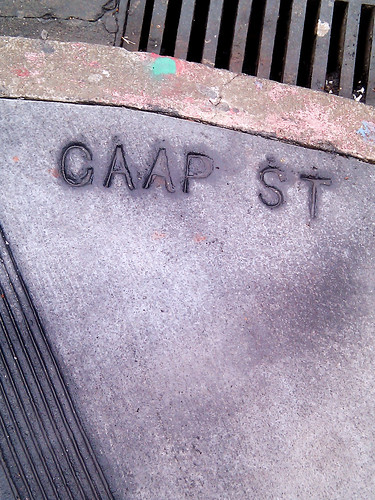
<p>Sometimes the wrong letters get doubled:<br />
<a href="https://www.flickr.com/photos/chrispcampbell/4610307867/in/set-72157624069169230/"><img src="https://farm2.static.flickr.com/1234/4610307867_3fcb0c315c.jpg" /></a><br />
CAAP ST [sic]<br />
18th St and Capp St<br />
<br /></p>

<p>Sometimes they use an upside-down M for a W:<br />
<a href="https://www.flickr.com/photos/chrispcampbell/4610917916/in/set-72157624069169230/"><img src="https://farm2.static.flickr.com/1133/4610917916_6d5f6c47cf.jpg" /></a><br />
WEBSTER [upside down M]<br />
Post St and Webster St<br />
<br /></p>

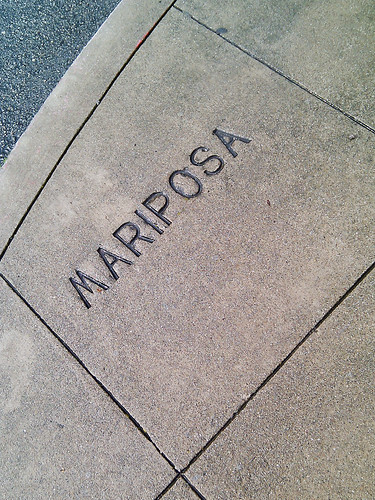
<p>Sometimes they use an upside-down W for an M:<br />
<a href="https://www.flickr.com/photos/chrispcampbell/4610918634/in/set-72157624069169230/"><img src="https://farm2.static.flickr.com/1041/4610918634_07bc59634a.jpg" /></a><br />
MARIPOSA [upside down W]<br />
Mariposa St and Harrison St<br />
<br /></p>

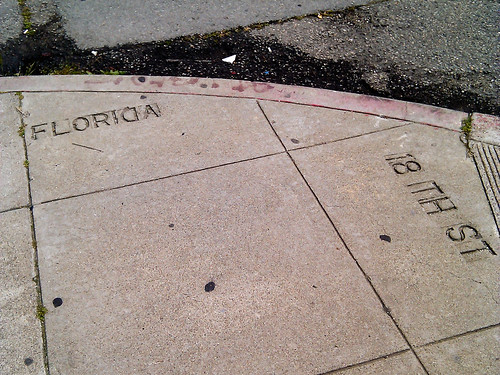
<p>Sometimes a letter gets flipped the wrong way:<br />
<a href="https://www.flickr.com/photos/chrispcampbell/4610311023/in/set-72157624069169230/"><img src="https://farm4.static.flickr.com/3315/4610311023_fb9bdf8ea3.jpg" /></a><br />
FLORIDA [backwards D]<br />
18th St and Florida St<br />
<br /></p>

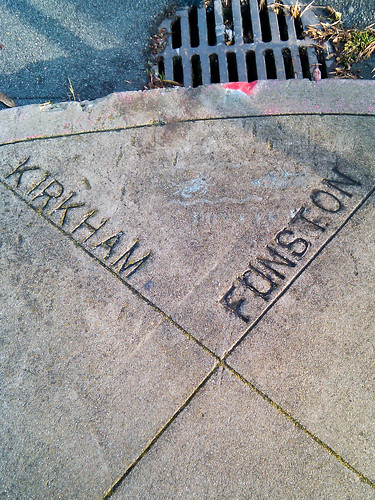
<p>Sometimes they realize their mistake and try it both ways:<br />
<a href="https://www.flickr.com/photos/chrispcampbell/4610919916/in/set-72157624069169230/"><img src="https://farm4.static.flickr.com/3558/4610919916_d80e9563d8.jpg" /></a><br />
F0NSTON [upside down U on right side up U]<br />
Funston Ave and Kirkham St<br />
<br /></p>
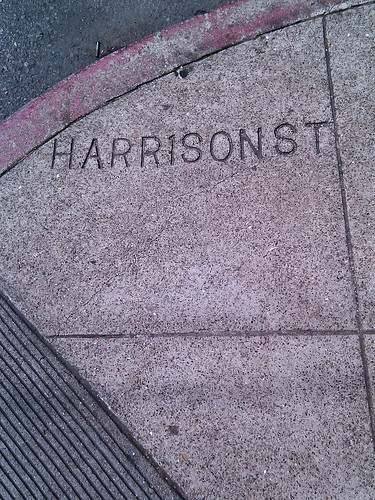
<p>Sometimes they use a number as a substitute for a letter:<br />
<a href="https://www.flickr.com/photos/chrispcampbell/4610920746/in/set-72157624069169230/"><img src="https://farm4.static.flickr.com/3373/4610920746_d63fdb45eb.jpg" /></a><br />
HARR1SON ST [sic]<br />
17th St and Harrison St<br />
<br /></p>

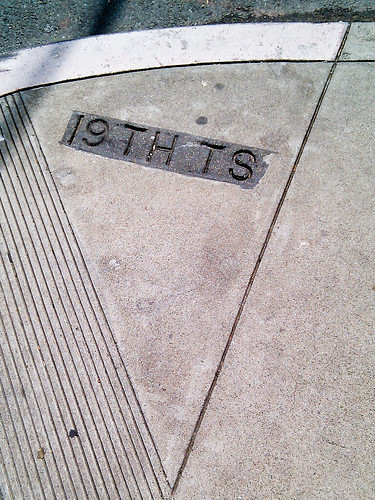
<p>Sometimes they get the abbreviation wrong:<br />
<a href="https://www.flickr.com/photos/chrispcampbell/4610921718/in/set-72157624069169230/"><img src="https://farm2.static.flickr.com/1196/4610921718_29f9634927.jpg" /></a><br />
19TH TS [sic]<br />
19th St and South Van Ness Ave<br />
<br /></p>

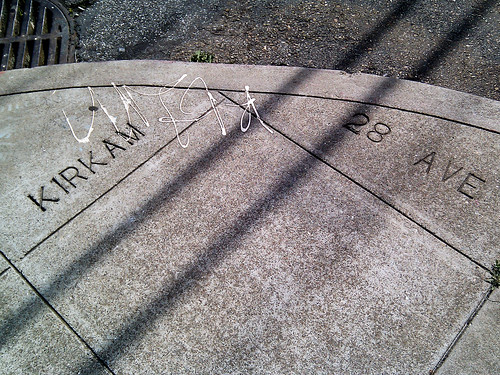
<p>Sometimes they forget a letter:<br />
<a href="https://www.flickr.com/photos/chrispcampbell/4610922346/in/set-72157624069169230/"><img src="https://farm4.static.flickr.com/3414/4610922346_286761d1bd.jpg" /></a><br />
KIRKAM [sic]<br />
28th Ave and Kirkham St<br />
<br /></p>

<p>Sometimes they add one letter too many:<br />
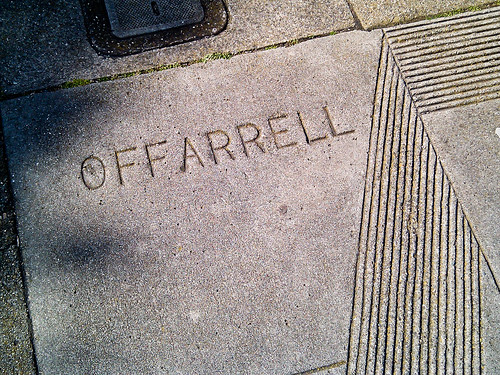
<a href="https://www.flickr.com/photos/chrispcampbell/4610313977/in/set-72157624069169230/"><img src="https://farm5.static.flickr.com/4051/4610313977_805c7d725b.jpg" /></a><br />
OFFARRELL [sic]<br />
O'Farrell St and St Joseph's Ave<br />
<br /></p>

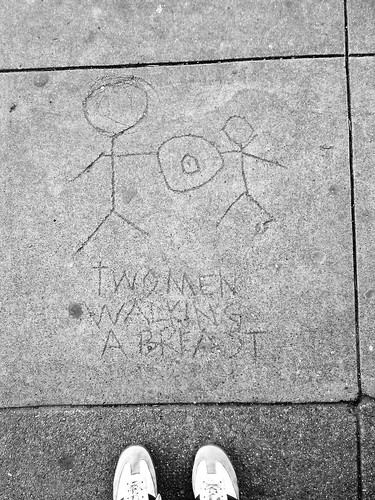
<p>Bonus!  It's not a street name, but this is my favorite sidewalk
etching in San Francisco.
Yes, it's a bit crude, but I think it's great that of all the things
this person could immortalize in concrete, they chose this visual pun:<br />
<a href="https://www.flickr.com/photos/chrispcampbell/4610314599/in/set-72157624069169230/"><img src="https://farm2.static.flickr.com/1357/4610314599_b7be26066c.jpg" /></a><br />
TWO MEN WALKING A BREAST<br />
9th Ave and Irving St<br />
<br /></p>

<p>My compulsion is unlikely to go away any time soon, so I’ll continue to
keep <a href="https://www.flickr.com/photos/chrispcampbell/sets/72157624069169230/">this Flickr set</a>
updated as I find more. 
If you know of any particularly good ones, add a comment and I’ll go check it out.</p>]]></content><author><name></name></author><category term="photography" /><summary type="html"><![CDATA[It all started back in 2001 when I graduated from college and moved to the Inner Sunset neighborhood of San Francisco. At nearly all intersections in San Francisco you will see the street names etched — sometimes not so carefully — into the concrete sidewalk. Every day I’d walk past the corner of 6th Ave and Judah St and smile when I saw JUDHA [sic] there in the sidewalk. If I was walking with a friend, I’d point it out with great amusement, at which point said friend would usually walk away while reconsidering our friendship.]]></summary></entry><entry><title type="html">Leaving Sun</title><link href="/2010/01/08/leaving-sun/" rel="alternate" type="text/html" title="Leaving Sun" /><published>2010-01-08T06:17:34+00:00</published><updated>2010-01-08T06:17:34+00:00</updated><id>/2010/01/08/leaving-sun</id><content type="html" xml:base="/2010/01/08/leaving-sun/"><![CDATA[<p>I’ve decided to leave Sun Microsystems, after spending 8+ years there
(well, 10+ years if you count my two internships) working on graphics
engines for the Java platform.
Tomorrow, January 8th, 2010 will be my last day on the job.
It has been a fun journey, and Sun was a great place to work.
I suspect that not many college grads stay at their first job for very
long, but I stayed with Sun for as long as I did because the work was
constantly challenging, yet enjoyable.
I love wrangling pixels, so I feel lucky that I got to do it for a living,
and that I was able to contribute to platforms that were used by so many
developers (and by millions of end users that probably don’t know what a
“Java” is or why it’s useful).</p>

<p>The hardest part of this change is leaving my great colleagues at Sun,
many of whom I worked with since my earliest days there as a quiet co-op
student (intern) and later as a new hire.
I’ve learned so much about software development, and a great number of
other random/wacky topics as well, from this team.
They are a unique bunch, replete with humor, brains, generosity, egos,
caring, quirks, ingenuity, and great storytelling abilities.
They’re like a family, and that’s why I’ll miss them.</p>

<p>So, what’s next for me? On Monday I will be starting at
<a href="https://plausible.coop">Plausible Labs</a>, a worker-owned software
cooperative here in San Francisco.
Java developers may know its founder,
<a href="http://landonf.bikemonkey.org/">Landon Fuller</a>, from his work
on SoyLatte and porting OpenJDK to Mac OS X.
I’m really excited to be working with Landon and Terri.
It should give me a chance to learn new technologies (iPhone and Android,
among others) and to see what life is like outside a corporate monolith.
I like the concept of the co-op (a relatively rare setup in the software
world) and I’m hoping we can make it a viable way to run a business.
I also like the idea of building local, community-focused software —
creating things that I would use myself, rather than building for unknown
“others.”</p>

<p>(I’m also very happy to be working closer to home; no more Caltrain!
Well, really I’m just trading one long commute for a shorter one involving
the equally unreliable Muni, but at least now biking to work is a reasonable
option.)</p>

<p>As part of this transition, I’ve finally set up this new website and blog,
where I can keep my professional and personal activities organized in one
location.
I’m not planning to post to my java.net blog any longer (since I expect to
be blogging about non-Java related topics in addition to the usual Java
stuff here), so if you’re accustomed to reading my (increasingly infrequent)
entries there, be sure to update your bookmarks.</p>

<p>I’ll stay subscribed to a few of the usual Java and OpenJDK-related mailing
lists, so I’m not planning to disappear completely.
That’s the great part about OpenJDK: it’s possible for me to remain involved
even though I’ll no longer be with Sun.
(I wish I could say the same for JavaFX!)</p>

<p>Happy 2010! It should be a fun year…</p>]]></content><author><name></name></author><category term="personal" /><summary type="html"><![CDATA[I’ve decided to leave Sun Microsystems, after spending 8+ years there (well, 10+ years if you count my two internships) working on graphics engines for the Java platform. Tomorrow, January 8th, 2010 will be my last day on the job. It has been a fun journey, and Sun was a great place to work. I suspect that not many college grads stay at their first job for very long, but I stayed with Sun for as long as I did because the work was constantly challenging, yet enjoyable. I love wrangling pixels, so I feel lucky that I got to do it for a living, and that I was able to contribute to platforms that were used by so many developers (and by millions of end users that probably don’t know what a “Java” is or why it’s useful).]]></summary></entry></feed>